Every report arrives
ready to fix.
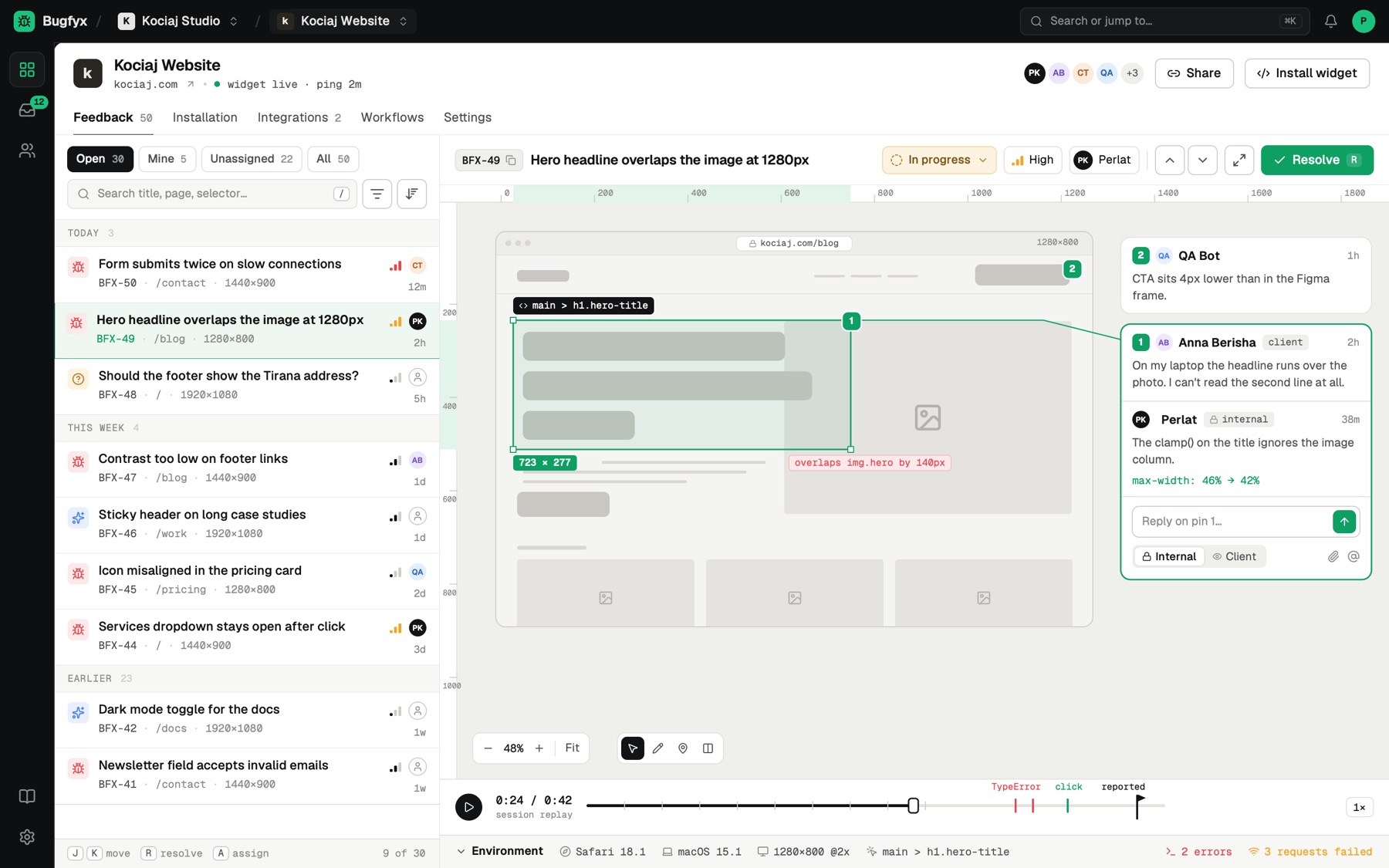
Your clients point at the problem and draw on it. Bugfyx adds the screenshot, element, browser, timings, console and replay, then drops it into an inbox you can clear from the keyboard.
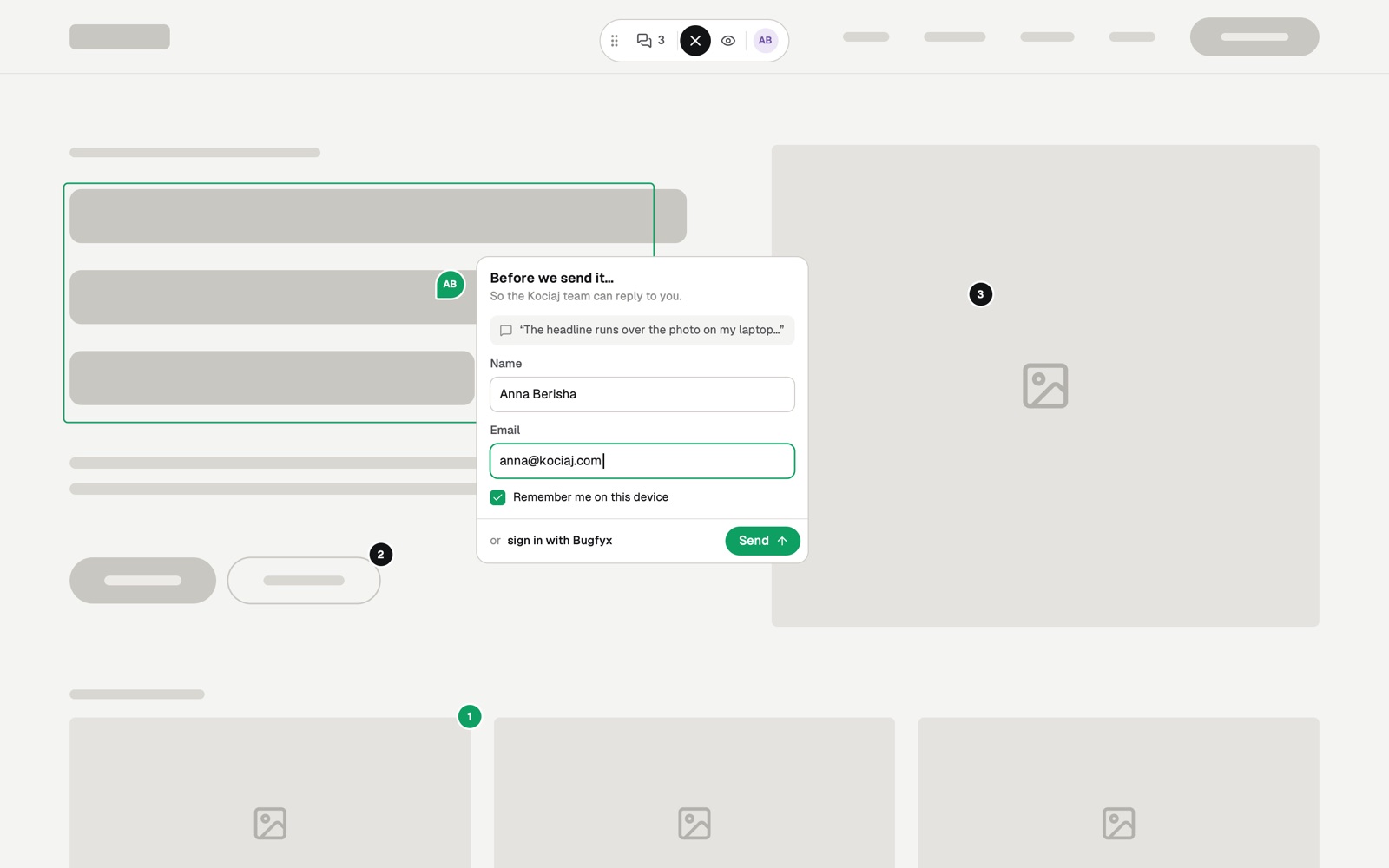
no login, no extension. just my name and email
A feedback button your clients can't get wrong.
One script tag puts it on any site. Clients press C or click Feedback, point at the element that looks off, draw on it and send. They never leave the page.
Four tools, nothing to learn
- Box
- Arrow
- Pen
- Redact
Copens the widget from anywhere on the page. Redact blacks out anything private before the screenshot is sent.
Six things you would have asked for anyway.
Every report carries the context a developer needs, captured on the reporter's device at the moment they hit Send. Nobody has to type it or remember it.
The example in the inbox above, BFX-49Hero headline overlaps the image at 1280px
- 1280 × 800 @2x
Annotated screenshot
The page as the client saw it, with their boxes, arrows and notes on top.
- main > h1.hero-title
Element
The CSS selector of what they clicked, so you land on the right node.
- Safari 18.1 · macOS 15.1
Browser and device
Browser, OS, viewport and pixel ratio.
- TTFB 180 ms · LCP 1.9 s
Page timings
How the page loaded for them, not for you.
- 2 errors
Console
Console errors from the page, up to 200 entries.
- 0:30 attached
Session replay
The 30 seconds before they reported it. Inputs are masked. Dev and Agency.
An inbox you can clear without touching the mouse.
Reports land in real time, grouped into Today, This week and Earlier. Switch between Open, Mine, Unassigned and All, then work down the list one key at a time.
Every report moves through
- Open
- In progress
- Resolved
- Archived
- JKNext and previous report
- RResolve the report
- AAssign to a teammate
- /Search by title, page or selector
Reply to clients where they reported it.
Each report has a thread. Mark a reply Client and they read it in the widget on their own site. Mark it Internal and only your team sees it. Numbered pins keep every remark tied to its spot on the page.
- Owner
- Billing, workspace settings and everything below.
- Admin
- Members, projects and integrations.
- Member
- Triage, assign, comment and resolve.
Safe to put on any client's site.
Agencies have to answer to their clients' legal teams. Here is exactly what the widget does, and doesn't, do.
What we capture
- A screenshot, only when someone sends a report
- Browser, OS, screen size and page URL
- Console errors and page timings
- The last 30 seconds of clicks and scrolls (paid plans)
What we never capture
- Anything typed into forms: every input is masked
- Areas reporters black out with the Redact tool
- Elements you mark with data-exclude
- Anything on domains you haven't allowed
For developers
Let your AI coding agent fix it.
Connect Claude Code, Claude Desktop or Cursor over OAuth 2.1. Your agent lists open reports, reads the screenshot, element and console errors, fixes the code, then replies to your client and resolves it.
- Claude Code
- Claude Desktop
- Cursor
$ claude mcp add --transport http bugfyx https://app.bugfyx.com/mcp
✓ Connected to Bugfyx

> Fix BFX-50 from the Bugfyx inbox
  read report, screenshot and 2 console errors
  edited  src/components/Hero.vue
  replied to Anna: "Fixed, live in 5 minutes"
✓ BFX-50 resolved
Stop decoding client emails.
Add Bugfyx to your site in two minutes. Free plan, no credit card.
your clients will thank you
Start free