bugfyxvsFeedbackFish
The FeedbackFish alternativewith screenshots and replay.
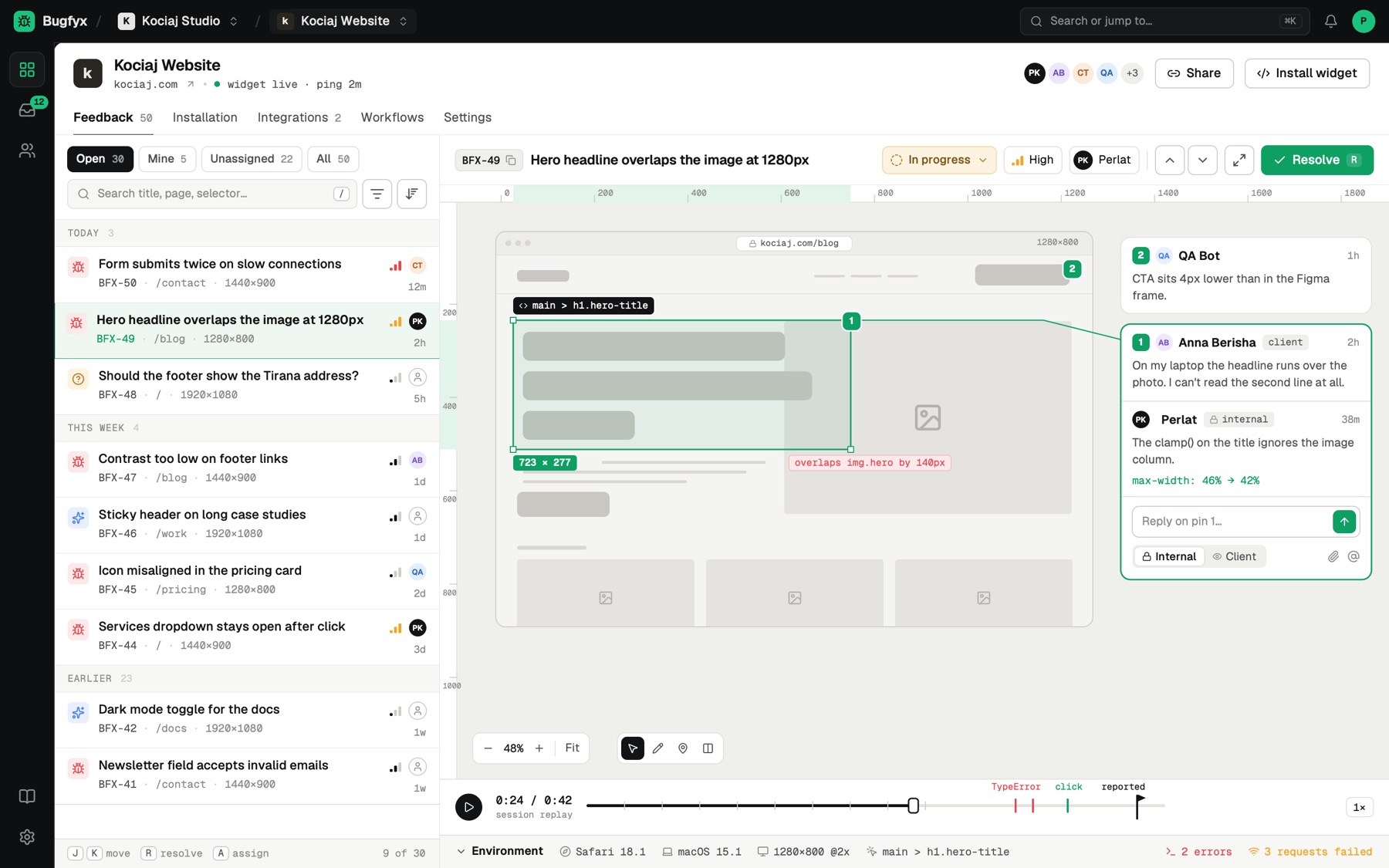
Bugfyx lets clients point at the problem and draw on it, then adds the element and browser details, plus console errors and a replay on paid plans, so you can fix it.
The quick verdict
We make Bugfyx, so read this with that in mind. Both tools do the core job well. The right pick depends on where your team already works.
Pick Bugfyx if
- You need to see the exact element and a screenshot, not just a sentence.
- You want console errors and a replay with each report.
- Your clients report with a name and email, and you don't pay a seat for each one.
- You want Claude Code or Cursor to read reports through MCP.
Pick FeedbackFish if
- A simple feedback form is all you need.
- You want the lightest possible setup.
- You do not need screenshots, console logs or replay.
What you pay, side by side
Bugfyx charges for projects. Your team and your clients never add to the bill.
your clients pay $0. always.
- Free
- $0
- 1 project, 50 reports a month, screenshots, browser details, email alerts
- Dev
- $29/mo
- 5 projects, unlimited reports, session replay, console logs, Slack, MCP
- Agency
- $59/mo
- Unlimited projects, everything in Dev, Trello, your branding on the widget
Yearly: Dev $276, Agency $564. Save 20%.
Pricing
- Plans and limits change. See FeedbackFish's pricing page for current details.
What Bugfyx includes
| Bugfyx | |
|---|---|
| Free plan | 50 reports a month |
| Paid plans from | $29/mo |
| Clients report without an account | Yes |
| Annotated screenshots | Yes |
| Console logs and browser details | Paid plans |
| Session replay | Paid plans |
| Slack and email | Email on every plan, Slack on paid |
| Trello | Agency plan |
| Jira, GitHub and Linear | On the roadmap |
| MCP for AI coding agents | Paid plans |
For FeedbackFish's current features and plans, see their website.
Where Bugfyx is different
Clients never take a seat
Clients report through the widget with just a name and email. Reporters don't need an account or a seat, so a busy month never turns into a bigger invoice.
- Your team
- Dev $29/mo
- Clients
- $0
Point at it and draw on it
Clients click the broken element and mark it up. You get the selector and an annotated screenshot, not a guess.
Console errors and replay
Browser, OS and screen size come with every report. Paid plans add console errors and a 30 second replay.
Reports your AI agent can read
The Bugfyx MCP server lets Claude Code, Claude Desktop and Cursor pull a report, read the selector and console errors, and start on the fix.
Where FeedbackFish is stronger
If any of this decides it for you, FeedbackFish is the better fit today. Better to pick the right tool once than to switch twice.
Simpler
If you only want a short line of text from visitors, a simple form may be all you need. Bugfyx does more, so there is a little more to it.
Switching takes 2 minutes.
Remove the FeedbackFish snippet and paste this line before </body>. Your clients get a Feedback button with no extension and no account.
<script src="https://app.bugfyx.app/api/projects/YOUR_PROJECT_ID/script" data-bugfyx_id="YOUR_PROJECT_ID" async></script>- Remove the FeedbackFish snippet
- Paste the Bugfyx script tag
- Invite your team. Clients need nothing.
Switching from FeedbackFish: questions
Is the free plan really free?
Yes. 1 project and 50 reports a month, with no credit card and no time limit. Upgrade when you need more projects or session replay.
Do my clients need a seat, an account or an extension?
No. They press C or click Feedback, leave their name and email, and send. Clients never count as seats.
Can I bring my FeedbackFish feedback over?
There is no importer today. Close out open issues in FeedbackFish and point new reports to Bugfyx from day one.
Do you integrate with Jira, GitHub or Linear?
Not yet. They are on our roadmap. Today reports go to Slack, Trello and email, and to AI coding agents through MCP.
What does a Bugfyx report include?
An annotated screenshot, the exact element, browser, OS and screen size. Paid plans add console errors and a 30 second replay.
Can I cancel any time?
Yes. Plans are monthly or yearly and you can cancel from the billing page whenever you like.
Try the FeedbackFish alternative for free.
Free plan, no credit card. Live on your site in two minutes.
your clients will thank you
Start free